Visualize your routes from start to finish in Systemize
If you’ve ever wished you could see your day’s routes instead of juggling addresses and schedules, the updated Maps feature in Systemize is designed for you.
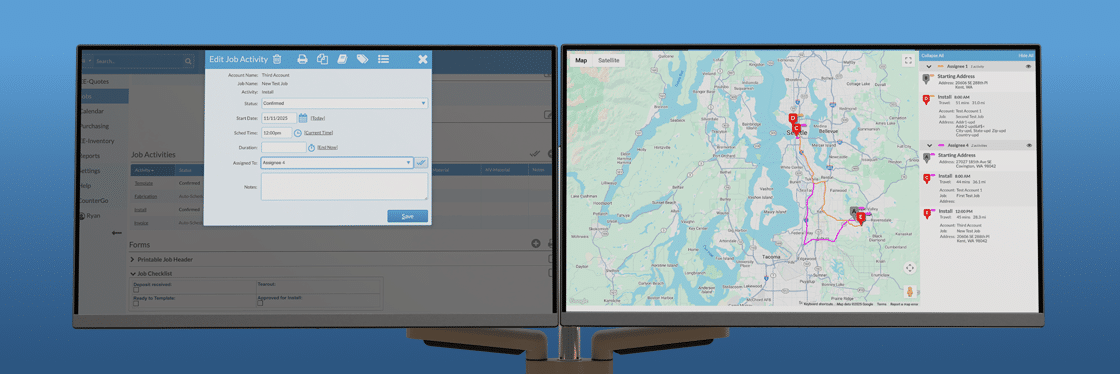
Schedulers can now view assignee routes on an interactive map—complete with starting locations, estimated travel times, and real-time visibility into how the day is structured.
Real-World Scenarios
Imagine this: You have three install crews leaving from your shop each morning. With Maps, you can instantly see which jobs are closest to each crew’s first stop. Maybe one installer’s first two jobs are 40 minutes apart—by glancing at the map, you notice another crew is finishing nearby. With a quick route adjustment, you’ve just saved an hour of drive time.
Or, as a scheduler, you might be coordinating templaters who live across town. By viewing their starting points on the map, you can assign jobs based on proximity instead of guessing who’s closest.
Pro Tip: Keep Your Workflow Organized with Multiple Screens or Tabs
Many users find it helpful to keep the Map page open on one screen or in a separate browser tab while keeping the Job Details page open on another. This setup makes it easy to adjust assignments and tweak routes in real time, ensuring each installer’s schedule is optimized.
Pro Tip: Use Assignee Colors to Visualize Routes
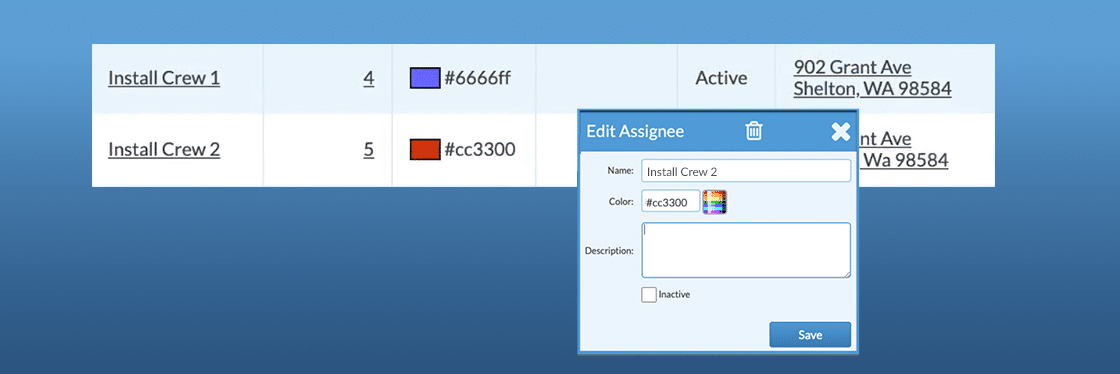
A powerful but sometimes overlooked tool is the Assignee color. Each team member or team can be assigned a color, so their stops appear in that color on the map. For example, if Ben is green, all of his stops will appear green. This visual cue helps schedulers avoid route conflicts and plan efficient sequences—so crews go A → B → C instead of A → C → B.
Learn more about setting Assignee colors →
The Big Picture
The Maps feature is designed to help you see the big picture—literally. Whether you’re managing one crew or many, it gives you the clarity and control to schedule smarter and deliver better service every day.
Not using Systemize yet? Book a demo with our team—we’d love to show you around.
What’s New: Quick Feature Overview (Video)